Powered by Olark

Duplicate File Remover

Duplicate File Remover is a powerful tool to locate file duplicates on your computer. It scans the computer and lists duplicate files based on Byte for Byte Comparison, which ensures 100% accuracy. It can find duplicates of any files: text, binary, music, video or images. For multimedia files (MP3, OGG/Vorbis, WMA), the contents of the following tags can also be analyzed: "Artist", "Album", "Title" and "Comment". The file Summary property can also be searched: title, subject, category, and author. Duplicate files can be deleted, hard-linked, moved, or copied. The list of duplicate files can be sorted, exported to an HTML report, and acted upon.

AllMixed DocumentsDocuments Images & PhotosPhotos MusicMusic Video Video

You may not realize how many duplicate files you have on your computer, after numerous downloads from the Internet, or scattered over your home or corporate network. Duplicate files are in most cases redundant and unnecessary, so keeping them is merely a waste of hard disk space. Your hard drives may be full of extra copies of documents, MP3s, photos and videos waiting to be removed. Duplicate File Remover will help you reclaim valuable disk space and improve data efficiency.

Note: Using Duplicate File Remover is safe and risk-free. By default, the deletion is to the Recycle Bin and, normally, the deleted files can be safely restored to their original locations. The software can log everything in a text report, and no actions will be performed on your precious data without your knowledge.
Duplicate File Remover big splash

Some situations where Duplicate File Remover can help

  • Identify and recover wasted disk space
  • Reduce the time and storage space used for backups
  • Eliminate the time wasted on unnecessary anti-virus scanning
  • Increase free space on "limited" resources, like laptops and memory disks
  • Reduce file searching time
  • Remove duplicate files to eliminate synchronization problems
  • And many more situations...

Program features

  • 100% accurate Byte by Byte comparison
  • Find files with same contents, same name, as well as zero size.
  • Find duplicate pictures, videos, music (MP3, WMA, OGG)
  • Very user-friendly wizard-driven interface
  • Works with removable media devices like Floppy, USB, etc.
  • Search both local and network disks
  • Find duplicate files based on criteria such as filename, byte by byte, etc.
  • Can look for duplicates in a given set of folders (i.e. without searching the whole drive)
  • Allows important folders to be excluded from scanning altogether
  • Can use wildcards and protects Windows system folders
  • Results can be exported to an HTML report for later review
  • Supports all modern Windows versions, including Windows® 2000/XP/2003/Vista/2008/Seven
  • Multilingual interface! More languages to follow.
    And much more...
  • Screenshots


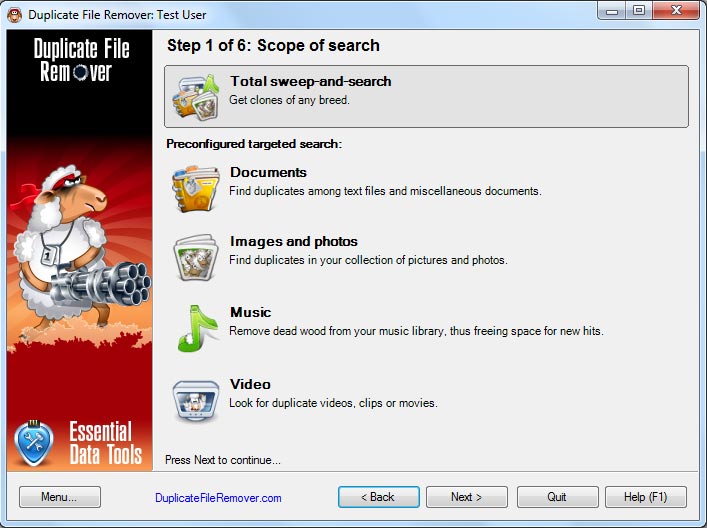
    Selection the type of files you want to find.


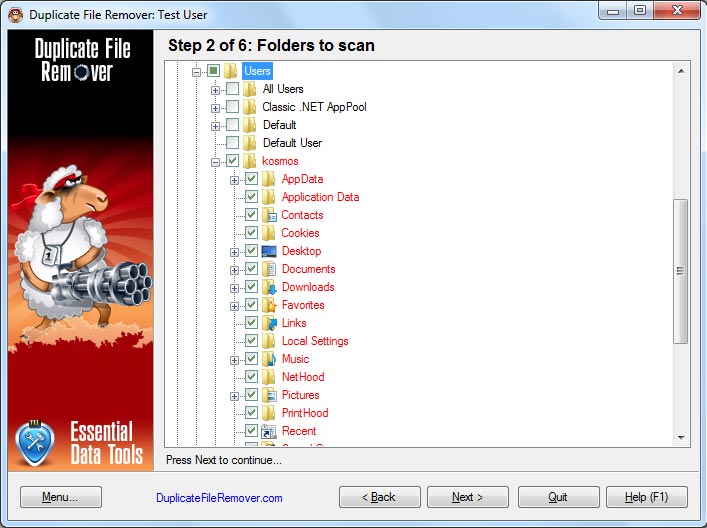
    Specify the folders to scan.


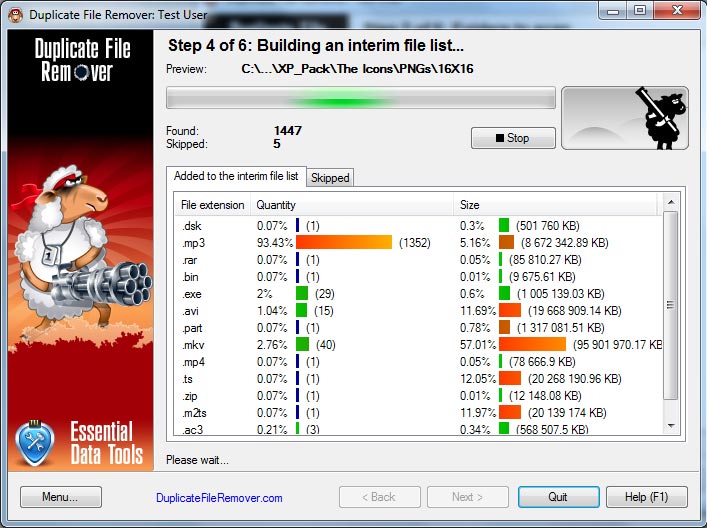
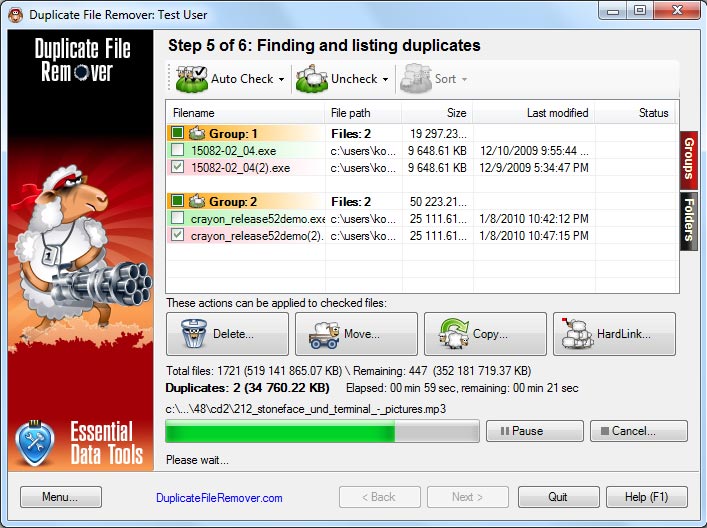
    Searching for duplicate files.


    Process (delete, move, hard link) duplicate files.

    * Click on the images above to enlarge.


    Download Trial Version

    You can download a free trial version (2649 KB) of Duplicate File Remover and test it before purchasing
    Primary Download
    Secondary Download

    Ordering Information

    Duplicate File Remover is shareware. If you would like to use all its features a registration is required. You can order the fully licensed version of Duplicate File Remover over the Internet with any major credit card.

    License typeUSD

    Single/Multiple License(s)

    $ 29.95
    Registration is instant and you will be sent your activation code by e-mail in a few seconds.
          Single/Multiple License(s)
    Number of licenses Price Per Unit
    1 $ 29.95
    2..4 $ 19.95
    5..9 $ 14.95
    10+ $ 9.95


    Quantity:  
    Contact sales
    Quick Info

          
       3.1  2012-01-13
       
    2000XP2003VistaSeven

    Download trial version File size: 2649 Kb
    Buy full version now Single user license: $ 29.95
    Program history

    v. 3.0
    General:
    + Logging of all events, incuding warnings and errors (DuplicateFileRemover.log)
    + Reduced load on the processor during data collection
    File types:
    + Changed the choice of file types to search. You can edit the group, group may contain not only files but also other groups, and so indefinitely.
    + Added a convenient editor to modify file types
    + New file types can be added by direct XML file editing
    + The list of file types and groups was significantly expanded
    Settings:
    + Reworked the advanced settings to remove unnecessary settings, increased speed of the directories exclusion
    Duplicates List:
    + Find duplicates step reorganized, expanded work area with duplicate files list
    + Reworked presentation of duplicates in a more informative tree, increased speed
    + Removed a tree structure of folders as it did not carry much meaning and reduce interface speed
    + Added file information preview (name of songs, pictures, etc. from the plug-ins)
    + Search for duplicate files (on 6-th step) in the upper right corner of the window (Searches all fields, case-insensitive search button below F2. Useful if you need to navigate through some files and pressing the space bar to mark them)
    Plugins:
    + Added support for plug-ins enhance the ability to search duplicates
    + Plugin for processing images
    + Plugin compares text files on the first 5 lines of text
    + Plugin to compare mp3 tags
    + Plugin to compare html files by tags

    Supported languages

    English  ChineseSimplified  Danish  Dutch  French  Hungarian  Korean  Polish  Turkish  
      

    Thanks for this. It has helped me to clear what was obviously a lot of unwanted copies of things taking up space. It is with genuine pleasure that i commend you for such a superb product. It is far superior to any others i have tried, particularly its speed and additional features. Without any doubt, i will recommend it to others as a purchase item. Full credit!